 Thinkific
Thinkific Review: The Best Platform to Build and Sell Online Courses
Thinkific is an online course platform that gives you a fully branded website, drag-and-drop course builder, built-in community, payment processing, and zero transaction fees on every plan. We tested every feature, compared it to Kajabi and Skool, and break down exactly who this platform is built for.
Spratt Enterprise Editorial Team
Software reviewed and tested independently
Our Verdict
Thinkific is the best course platform for creators who want full ownership of their brand. You get your own domain, your own website, your own checkout experience, and zero transaction fees. The drag-and-drop builder is simple enough to launch a course in a day but flexible enough to grow into a full education business. The main tradeoff is that advanced marketing automation and community features require pairing Thinkific with external tools.
Best for: Solo creators, coaches, consultants, and educators who want to build a professional course business on their own domain without giving up revenue to transaction fees or building inside someone else's ecosystem.
What Is Thinkific?
Thinkific is an all-in-one online course platform that lets you create, market, and sell courses from your own branded website. Unlike marketplace platforms where you list courses alongside competitors, Thinkific gives you a standalone site with your domain, your design, and your checkout flow. You own the entire customer experience from the first click to course completion.
You upload your videos, PDFs, and lesson content into a drag-and-drop course builder. Thinkific handles the student login, progress tracking, payment processing, and course delivery. You focus on creating content and driving traffic. The platform also supports digital downloads, coaching sessions, webinars, memberships, and course bundles, so you are not limited to just selling one type of product.
The platform has been around for over a decade and powers more than 50,000 course creators. It sits in the sweet spot between simplicity and control. You do not need a developer or a tech team to get started, but you are not locked into a rigid template either. Whether you are a fitness coach packaging workout programs, a consultant selling frameworks, or an educator building a certification course, Thinkific adapts to your business model. For a broader look at tools we review, check our online education reviews.

Key Features
The Dashboard: Your Command Center
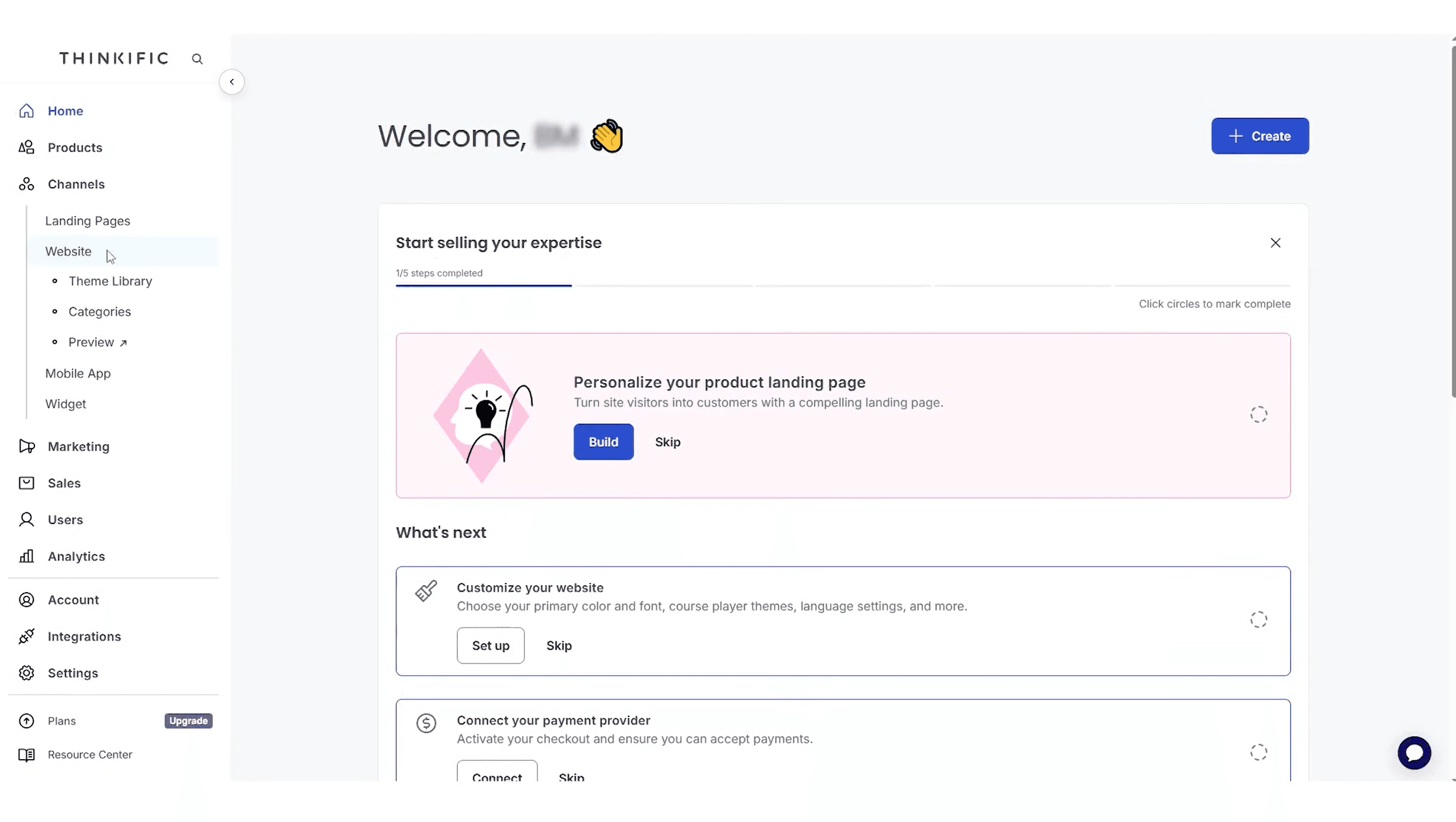
When you log into Thinkific, the dashboard walks you through everything step by step. It tells you exactly what to do next: personalize your landing page, customize your website design, connect your payment provider. There is a progress bar that tracks your setup completion. This guided onboarding is one of the reasons beginners get their first course live so fast.
The left sidebar organizes everything logically. Products (courses, communities, digital downloads, coaching, webinars, memberships), Channels (landing pages, website, theme library, mobile app, widgets), Marketing, Sales, Users, Analytics, Integrations, and Settings. You never have to hunt for anything. Every feature is exactly where you would expect it.
Course Builder: Create Any Type of Learning Product
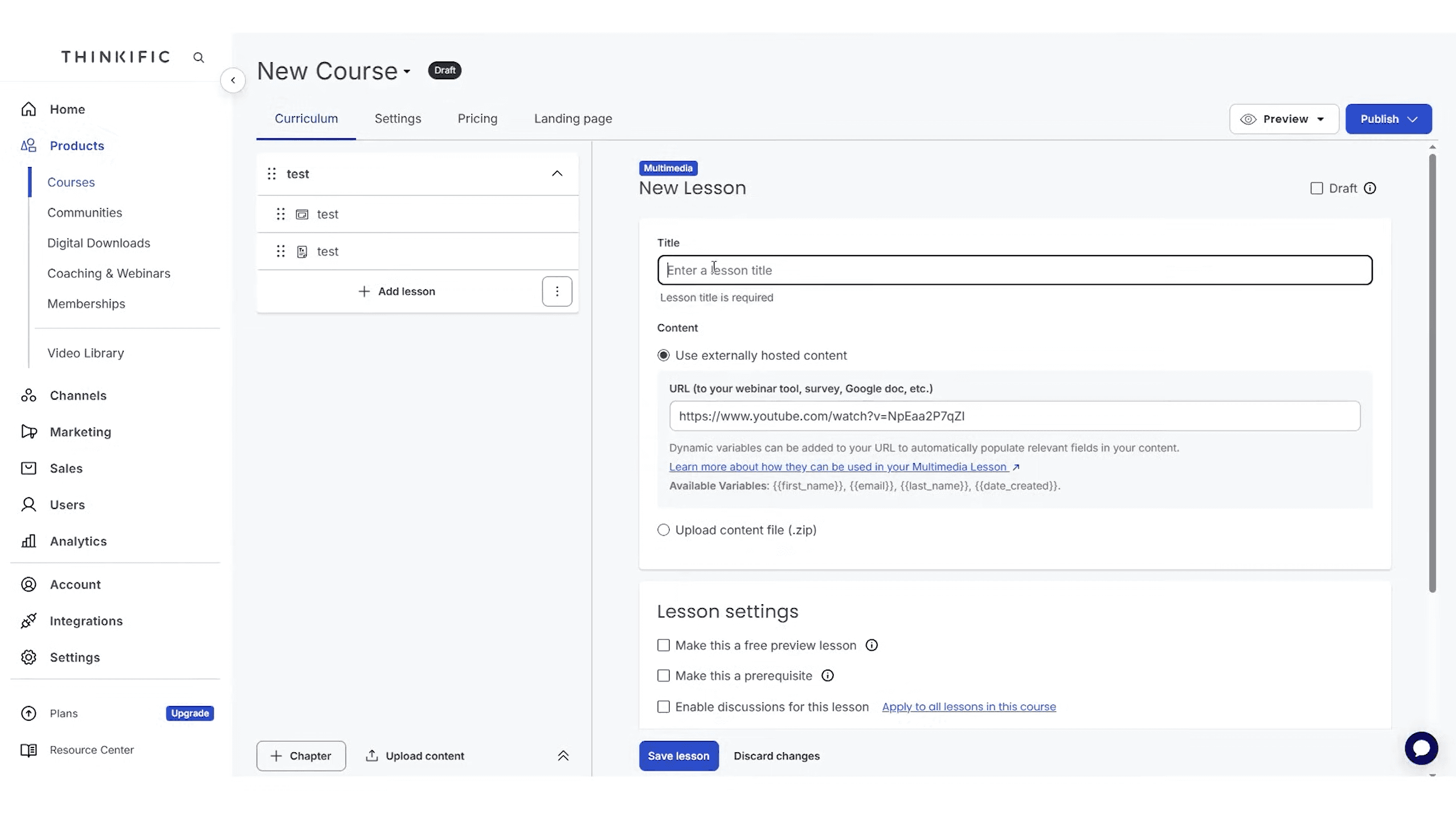
The course builder is where you spend most of your time. You organize content into chapters and lessons, then drag them into the order you want. Each lesson can be a video, text, PDF, audio file, slideshow presentation, quiz, survey, or downloadable resource. You can also embed externally hosted content like YouTube videos, Google Docs, or Typeform surveys by pasting a URL.
Thinkific provides pre-built course templates to speed things up: mini-course, flagship course, pre-sell, membership library, and webinar replay. You pick a template, swap in your content, and you are live. The bulk importer lets you upload multiple files at once instead of adding them one by one. Each lesson has settings for making it a free preview (great for marketing), marking it as a prerequisite, and enabling discussion forums.
Beyond standard courses, Thinkific lets you create digital downloads, coaching products, webinars, and memberships all from the same product menu. This means you can sell a $29 downloadable template pack alongside a $500 flagship course and a $49/month membership, all from one platform.
Curriculum Editor: Chapters, Lessons, and Drip Scheduling
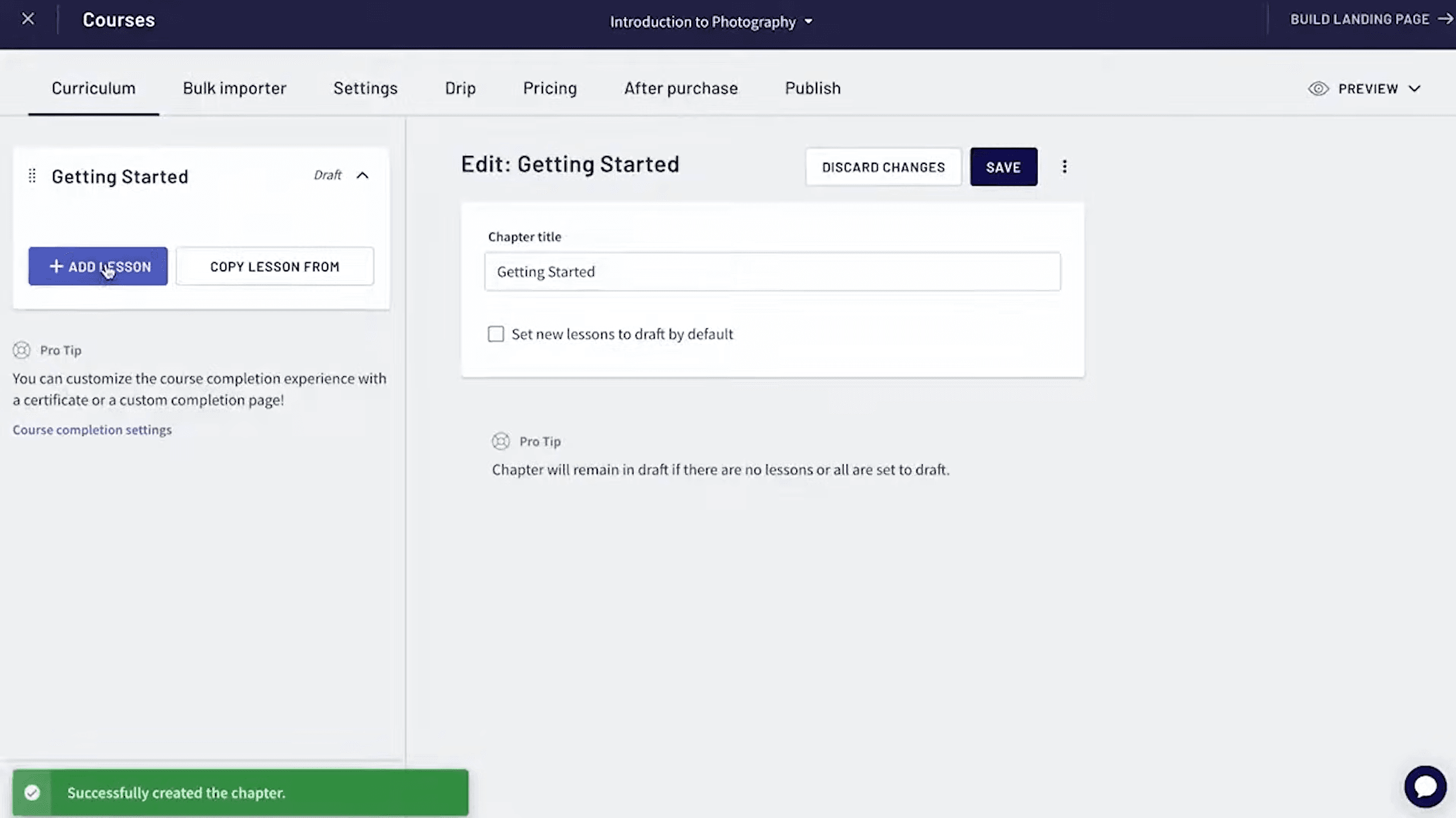
The curriculum editor is where you structure your course into chapters and individual lessons. You add chapters with titles, drag lessons into order, and use the bulk importer to upload content files quickly. Each chapter can have its own completion settings. The editor also shows pro tips inline, like how to customize the course completion experience or create a custom completion page.
Drip scheduling lets you release lessons on a timed schedule after enrollment. This is critical for keeping students engaged over time instead of letting them binge everything on day one and forget about it. You can also set prerequisites so students must complete certain lessons before accessing others. The "After Purchase" and "Publish" tabs give you control over the checkout thank you page and course visibility before you go live.
Website Builder: Your Own Branded Course Site
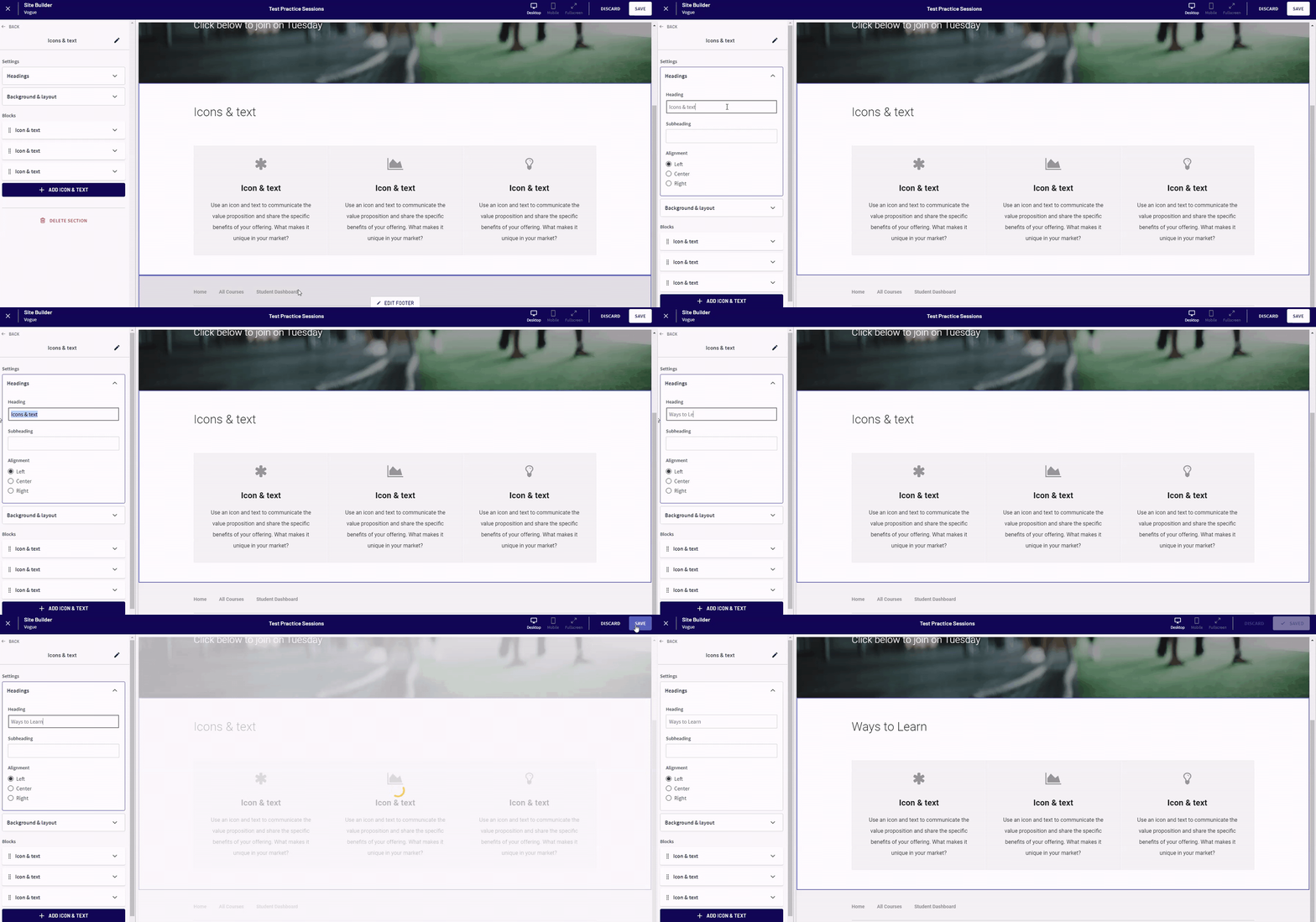
This is the feature that separates Thinkific from platforms like Skool. You get a complete website builder with 10 pre-designed themes and 23 customizable page sections including CTAs, testimonials, FAQs, pricing tables, and hero banners. You can drag sections around, change colors and fonts, add your logo, and build out a homepage, landing pages, checkout pages, and a student dashboard.
Everything lives on your custom domain. If you already have a WordPress site or another main website, you point a subdomain to Thinkific and link between them. Your course site looks and feels like part of your brand, not a third-party platform. You can embed podcast episodes, YouTube videos, and blog content to create a rich experience that builds trust and keeps visitors on your site longer.
The builder is not as flexible as a full website builder like WordPress or Webflow, but that is intentional. It is constrained enough that you cannot break anything, but flexible enough to create a professional, branded experience without touching code.
Zero Transaction Fees on Every Plan
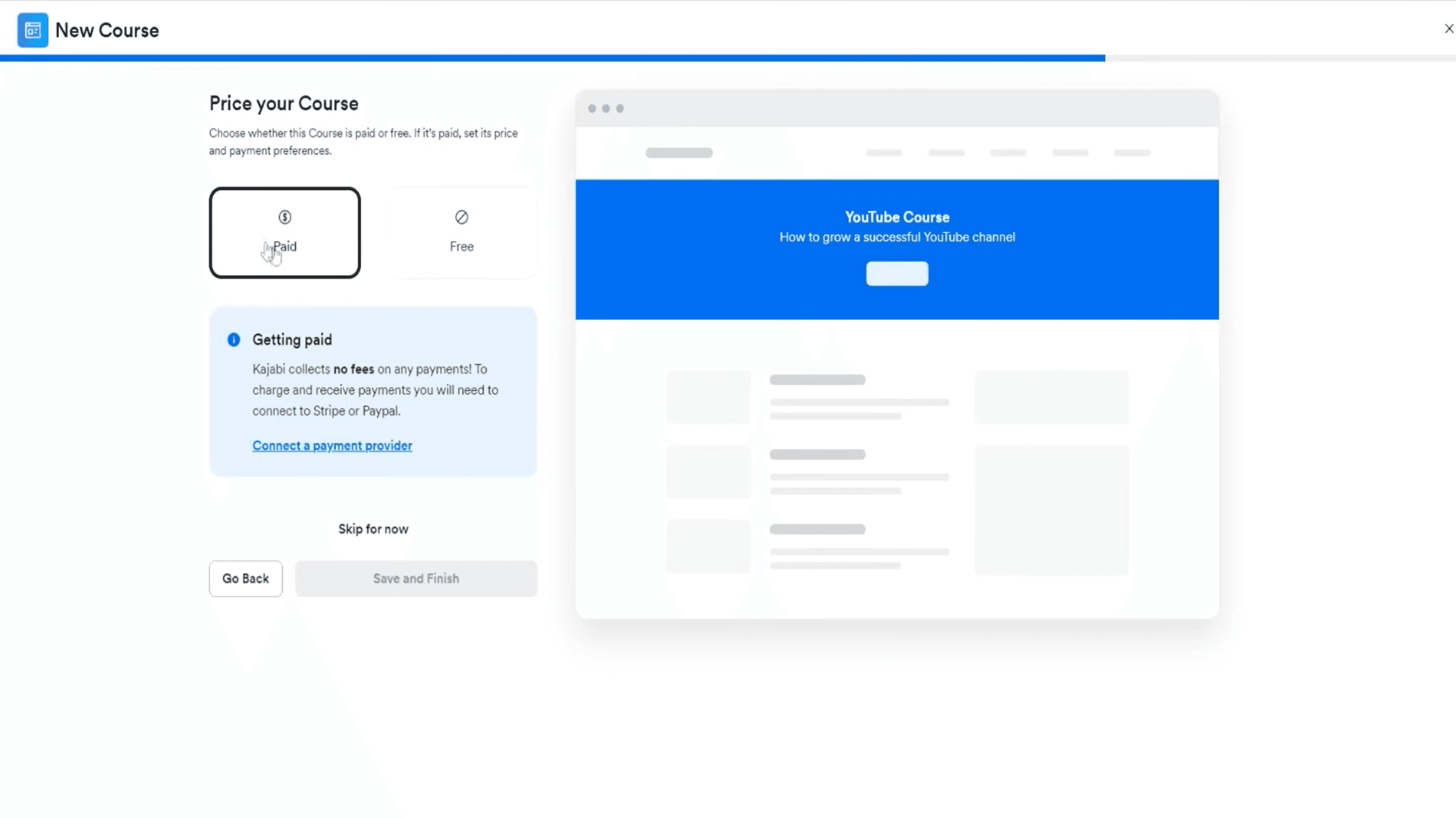
This is the single biggest differentiator for Thinkific. Every plan charges zero transaction fees. You keep 100% of your revenue minus standard payment processing (Stripe or PayPal fees). The pricing screen even highlights it: "Kajabi collects no fees on any payments." Teachable charges transaction fees on lower-tier plans. Kajabi is fee-free but starts at a much higher price point. Thinkific gives you zero fees from day one, even during your free trial.
When you are starting out and making your first few sales, this matters more than anything. A 5% transaction fee on a $200 course is $10 per sale. Sell 100 courses and that is $1,000 going to the platform instead of your pocket. Sell $10,000 in courses per month and you are losing $500/month to fees alone. Thinkific eliminates that entirely. You connect Stripe or PayPal, set your price (paid or free), and you are ready to collect payments.
Live Lessons: Host Real-Time Classes Inside Your Course
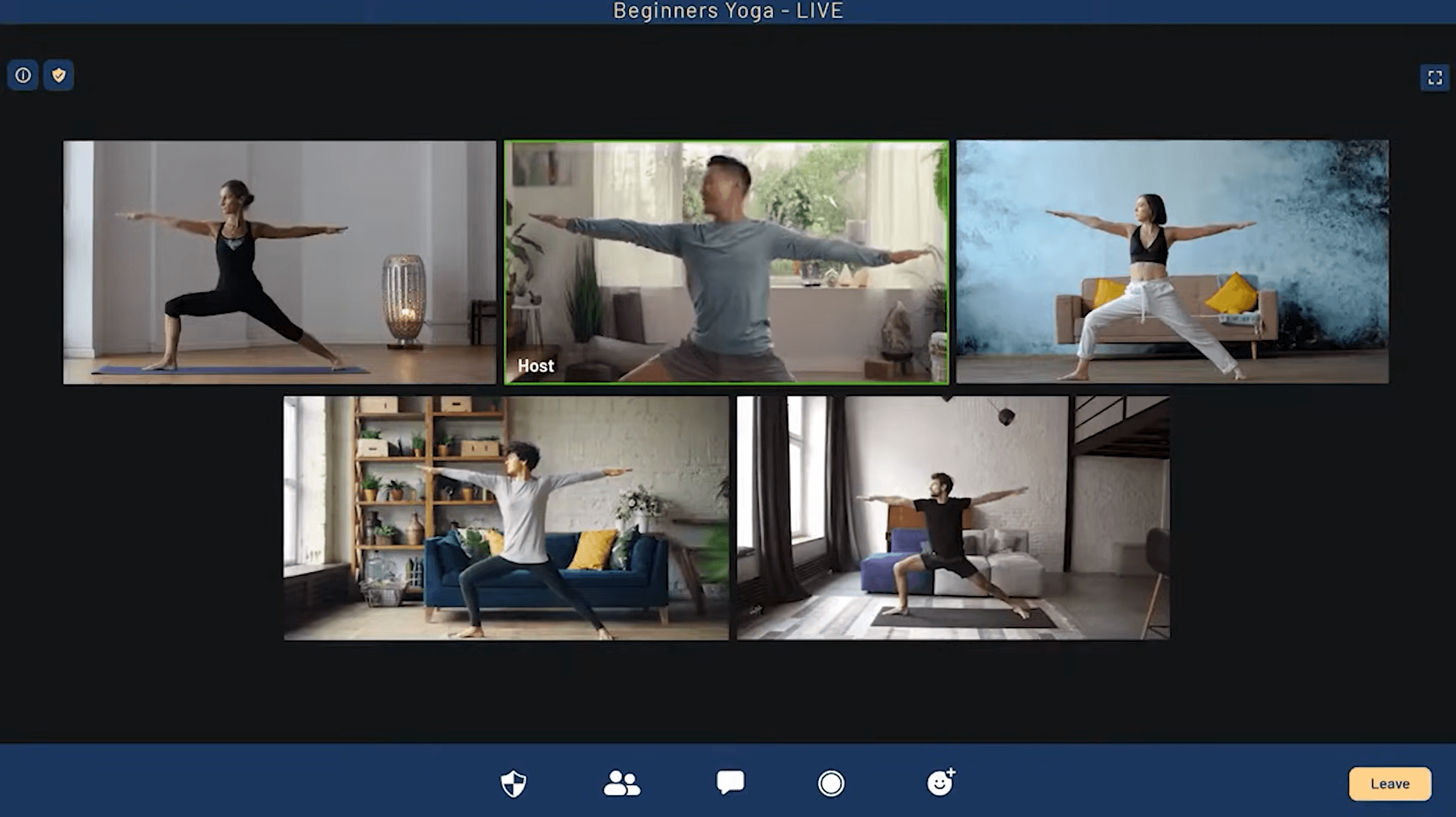
On the Start plan and above, Thinkific integrates directly with Zoom so you can host live lessons inside your course. Students join from within the course player. This is ideal for coaching programs, live Q&A sessions, group workshops, and hybrid courses that mix pre-recorded content with live interaction.
The live lesson experience is seamless. Students see the live session in their course curriculum alongside regular video lessons. You schedule the session, students get notified, and everyone joins from the same place. No separate Zoom links to share. No confusion about where to go. It all lives inside your Thinkific course.
Course Player: Clean Student Experience
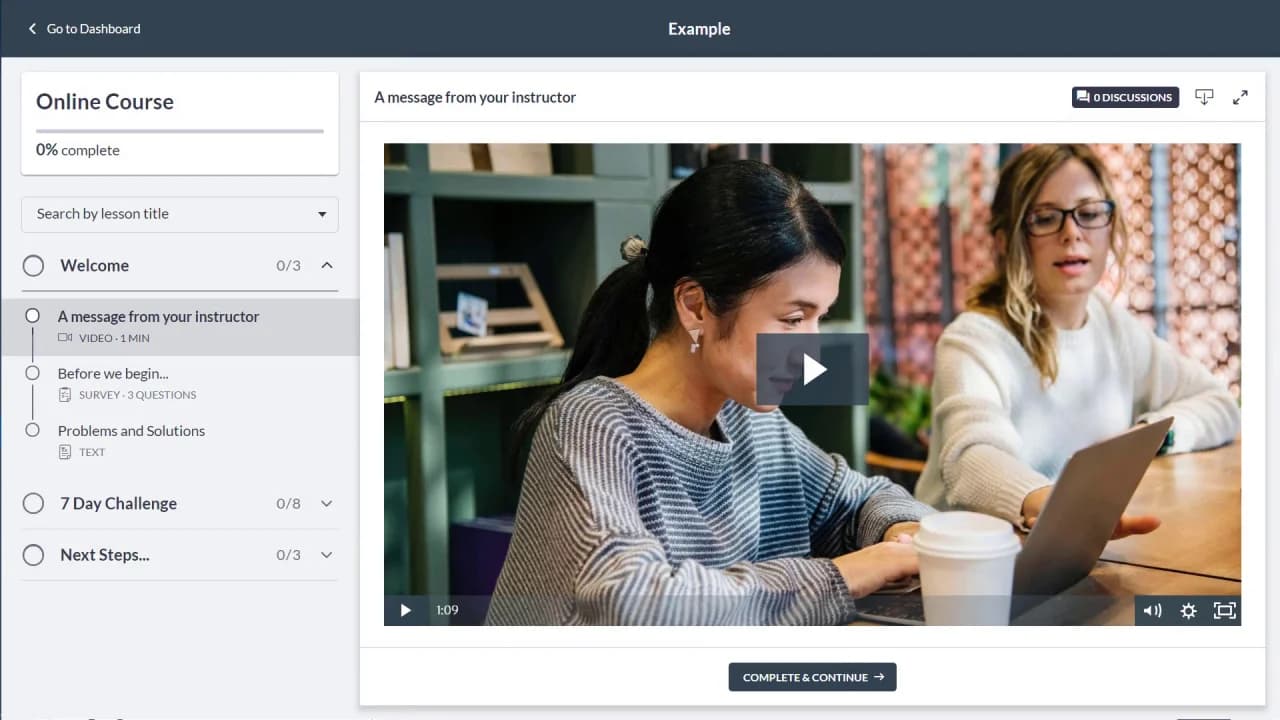
The course player is what your students see when they take your course. It is clean, distraction-free, and focused entirely on learning. The left sidebar shows the course outline with chapters and lessons. Students can see their completion percentage, search by lesson title, and navigate between sections easily. Each lesson shows its type (video, survey, text) and duration.
The "Complete & Continue" button at the bottom creates a natural flow through the course. Discussion forums are accessible directly from each lesson, so students can ask questions in context without leaving the content. The player supports video, text, downloads, quizzes, and surveys, all rendered cleanly in the main content area.
Memberships and Bundles: Recurring Revenue
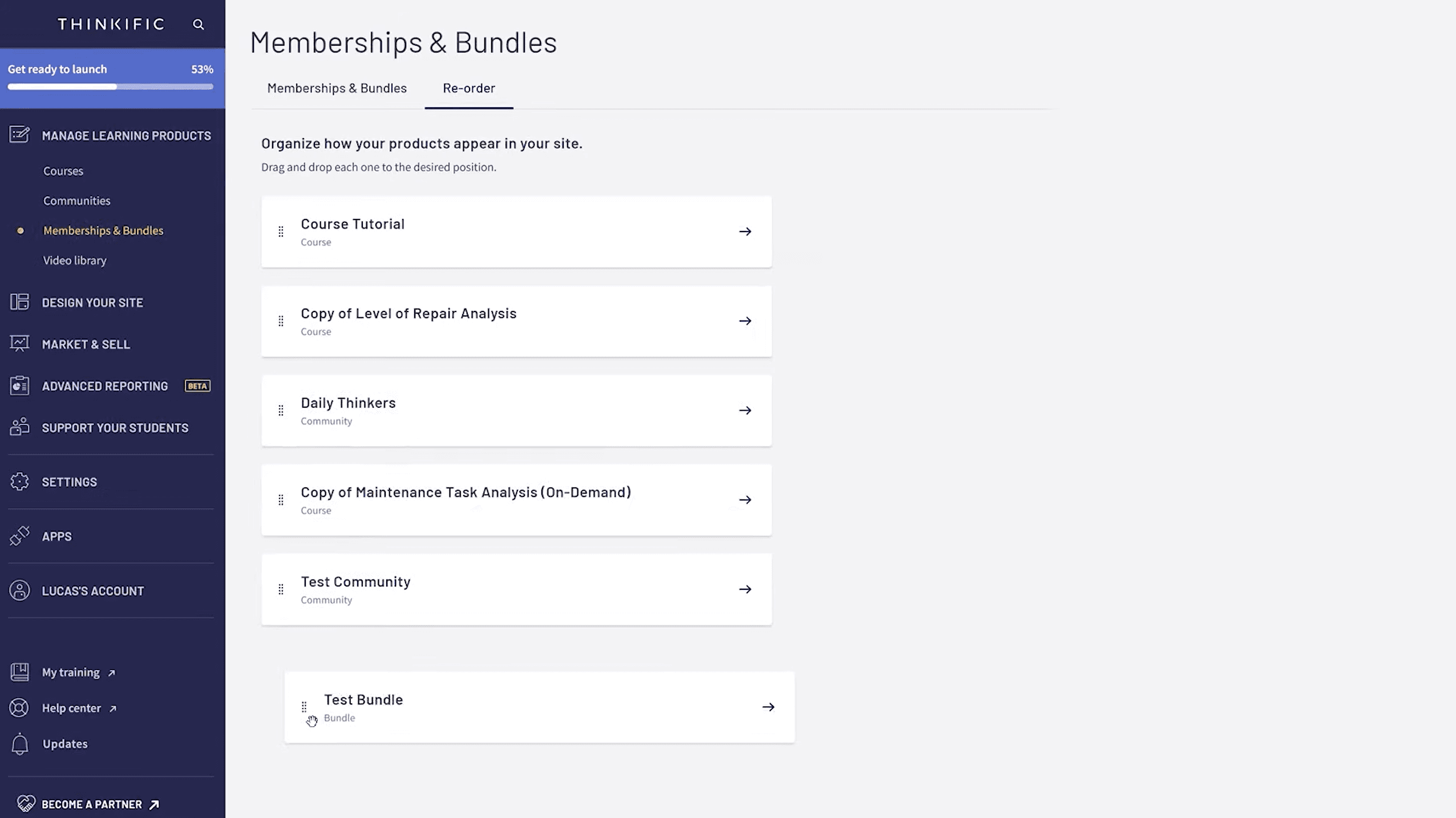
Thinkific supports memberships, course bundles, and subscription-based access on the Start plan and above. You can package multiple courses into bundles at a discounted rate, create monthly or annual membership tiers with drip content, and manage all your products from a single dashboard.
The Memberships & Bundles section lets you organize all your products, reorder them, and control how they appear on your site. You can mix courses with communities, bundle a flagship course with bonus materials, or create an "all-access pass" membership that unlocks everything. This flexibility lets you build multiple revenue streams from the same content library.
Analytics and Reporting
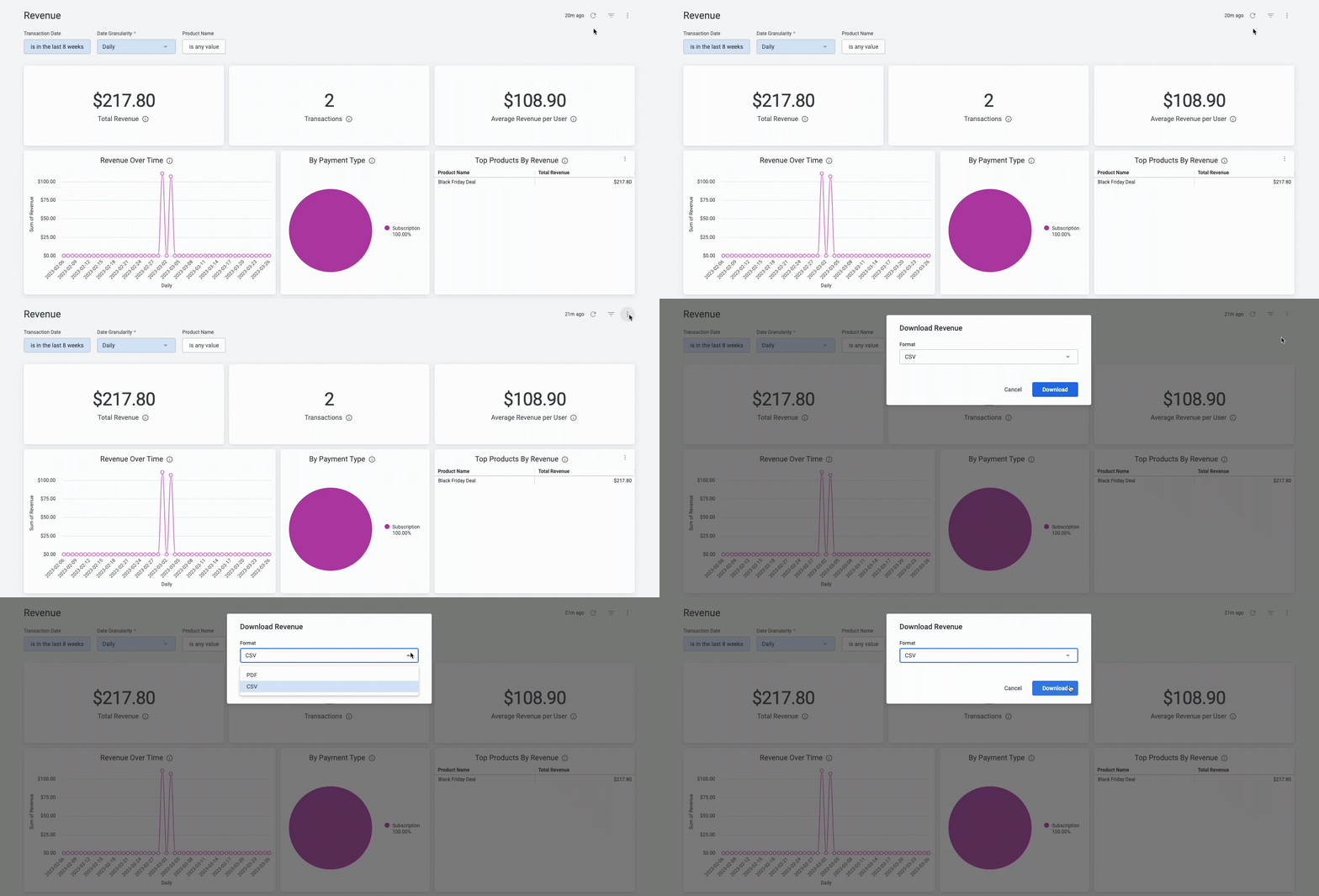
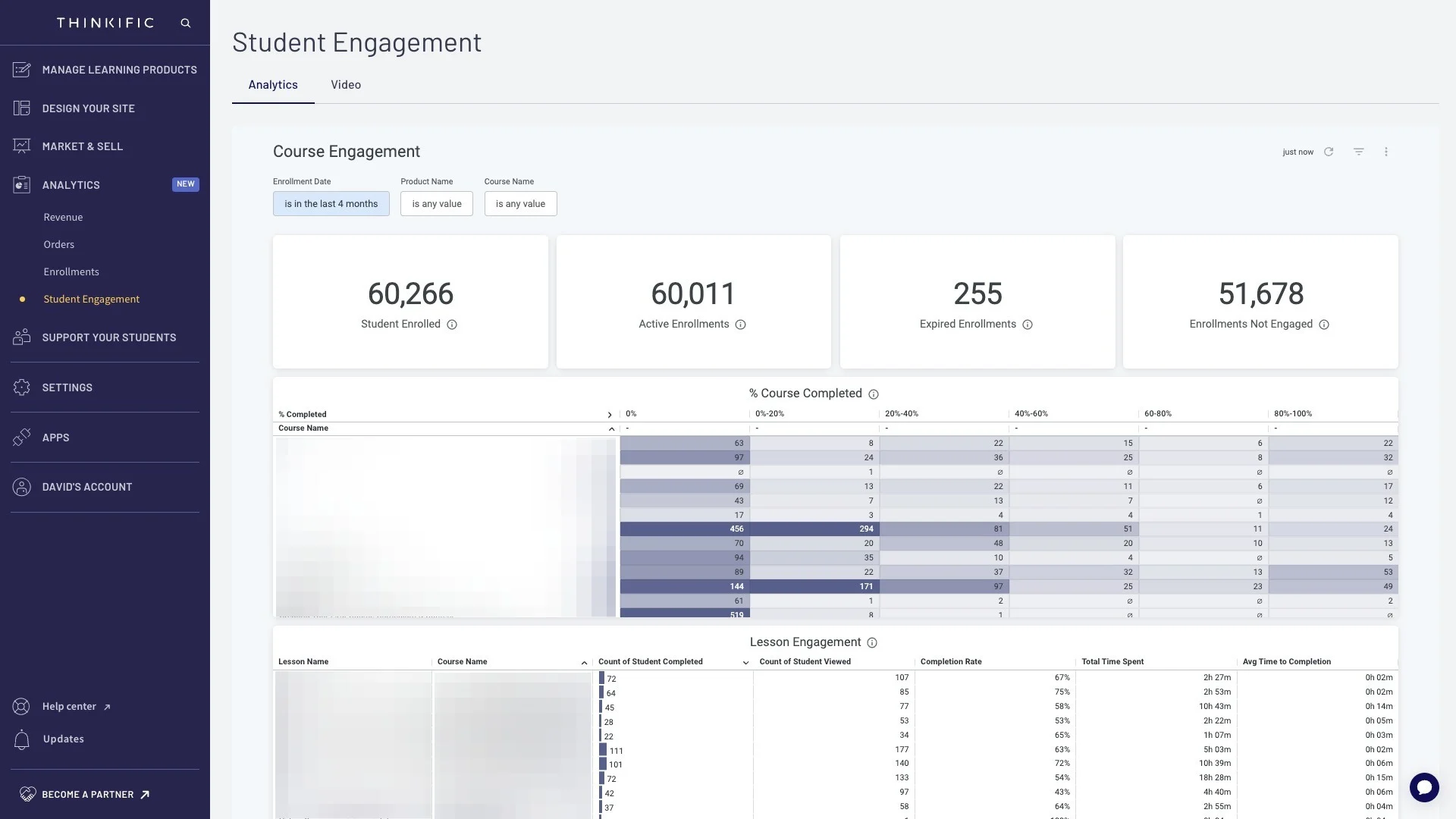
The analytics dashboard shows revenue trends, enrollment numbers, student progress, and course completion rates. You can see which courses are selling, where students are dropping off, and how your revenue trends over time. Completion rate tracking is particularly useful because it shows you which lessons or chapters need improvement.
Thinkific also has an Advanced Reporting feature (currently in beta on higher plans) that gives you deeper insights into student behavior and course performance. For standard analytics needs, the built-in reports are functional. If you need advanced cohort analysis, funnel tracking, or custom dashboards, connect Google Analytics through the app store for the full picture.
App Store and Integrations
Thinkific has an app store with 80+ integrations. The major ones include Zoom for live lessons, Mailchimp and ConvertKit for email marketing, Zapier for connecting to any tool, Google Analytics for tracking, Salesforce for CRM, Intercom for live chat support, and Shopify for selling physical products alongside courses.
This modular approach is a strength. Instead of getting a mediocre all-in-one experience where every feature is a 6 out of 10, you connect the best tools for each job. Use ConvertKit for email sequences. Use Deadline Funnel for urgency-based launches. Use Circle for advanced community. Thinkific sits at the center handling course delivery and payments while specialized tools handle everything else. You build a tech stack that is exactly right for your business instead of being forced into whatever the platform decided to build.
Built-In Community
Thinkific added community features that let you create branded social spaces for your students. Think of it as a private social network tied to your courses. Students can post, discuss, share wins, ask questions, and interact with each other and with you. Community spaces are organized by topic and the number of spaces depends on your plan (1 on Basic, expanding on Start, and 3 full communities on Grow).
This is not as robust as a dedicated community platform like Skool or Circle. If community is the core of your business model (paid masterminds, daily engagement, gamification), you may want a specialized tool. But if you want a simple way to keep students engaged alongside your course content without paying for another monthly subscription, Thinkific's community does the job.
Student Engagement Tools
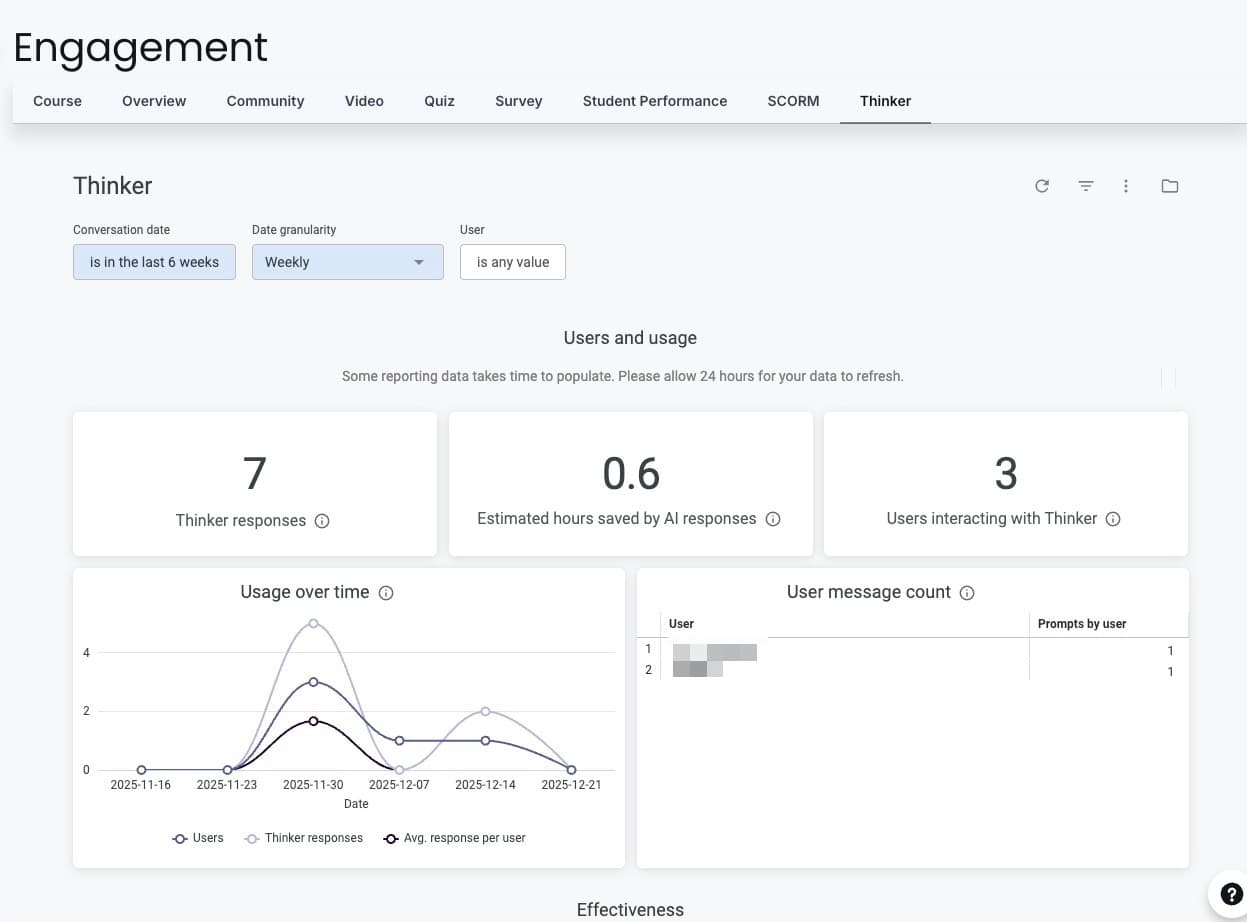
Thinkific includes tools to keep students progressing through your course and completing it. Drip scheduling releases lessons on a timed schedule so students do not binge everything and disappear. Completion certificates reward students who finish. Discussion forums under each lesson let students ask questions in context. Automated email notifications keep students coming back.
On the Start plan and above, you get assignments that students submit for review, quizzes for knowledge checks, and live lessons through Zoom integration. The live lesson feature connects directly to your Zoom account so you can host live coaching calls, Q&A sessions, or workshops right inside your Thinkific course without sending students to a separate platform.
Payment Flexibility
Thinkific supports multiple payment models: one-time purchases, payment plans (split a $500 course into 3 monthly payments), subscriptions for membership content, and course bundles that package multiple courses together at a discounted rate. Payments process through Stripe or PayPal with zero platform fees.
You can create coupons, run limited-time promotions, and offer free trials. Order bumps let you offer an upsell during checkout (like a bonus module or a one-on-one session). The affiliate marketing tools on Basic and above let others promote your courses for a commission. Thinkific also integrates with Shopify if you sell physical products alongside your courses.
Free Training Resources
Thinkific includes free training courses to help you succeed. The "Fast Track" course walks you through 28 video tutorials on building and launching your first course. There are additional training courses on marketing, pricing, and growing your business. The Help Centre has 500+ articles. And the Thinkific Experts marketplace connects you with accredited consultants if you want hands-on help building or launching your course.
This level of training support is uncommon. Most platforms give you documentation and a support ticket system. Thinkific gives you structured courses on how to actually build a course business, not just how to use the software. That distinction matters when you are starting from scratch.
AI-Powered Course Tools
Thinkific has added AI features that most competitors have not matched yet. The AI quiz generator creates assessment questions from your lesson content automatically. AI captioning adds subtitles to your videos without manual transcription. And the AI course outline tool helps you structure your entire course from a topic description, generating chapters, lesson titles, and a recommended flow.
These are not gimmicks. The AI quiz generator alone saves hours of work for creators who want to add knowledge checks throughout their course. Instead of writing 50 quiz questions by hand, you let the AI generate them from your lesson content and then edit the ones you want to keep. For creators who produce a high volume of course content, these tools meaningfully reduce production time.
What Real Users Say: Thinkific on Trustpilot
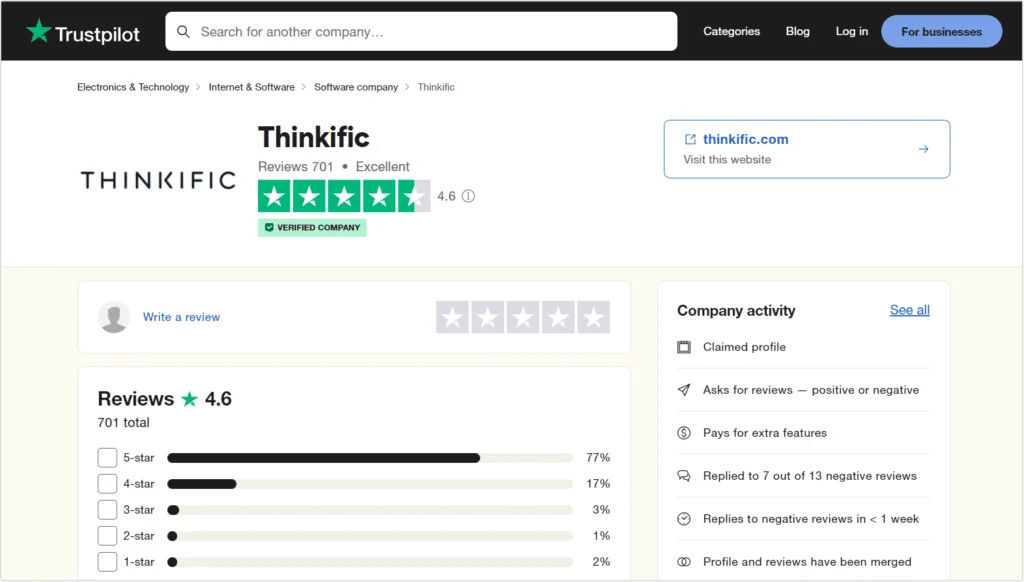
Thinkific holds a 4.6 out of 5 rating on Trustpilot from 701 verified reviews. That is an "Excellent" rating with 77% of reviewers giving 5 stars and another 17% giving 4 stars. Only 3% of reviews are 3 stars or below. For a SaaS platform, that is an exceptionally strong score.
The positive reviews consistently praise the ease of use, the course builder quality, and the customer support team. The small number of negative reviews (2% one-star) typically mention billing-related issues like unexpected charges after free trials. Our advice: if you sign up for a trial, set a calendar reminder before it converts to a paid plan. Cancel through your account settings well before your renewal date if you decide not to continue.
The combination of a 4.6 Trustpilot score with strong editorial reviews across G2 and eLearning Industry confirms what we found in our own testing: Thinkific is a well-built platform with genuine user satisfaction. We factor all of this into our 4.3 rating, which accounts for the minor limitations in templates, reporting depth, and reliance on external tools for email marketing.

How Creators Use Thinkific
- Online courses: The core use case. Upload your video lessons, organize them into chapters, set a price, and sell from your own branded website with zero transaction fees
- Coaching programs: Combine pre-recorded lessons with live Zoom sessions, assignments, and community spaces for a hybrid coaching experience that scales beyond one-on-one time
- Membership sites: Create recurring revenue with monthly subscriptions. Drip content over time so members always have something new to engage with
- Corporate training: Companies use Thinkific to train employees, onboard new hires, and deliver compliance training with progress tracking and certificates. For a dedicated employee training platform, see our Trainual review
- Digital product bundles: Package courses with downloadable resources, templates, worksheets, or tools. Sell them as bundles with a single checkout
- Certification programs: Build courses with quizzes, assignments, and issue completion certificates. Used by professional organizations, industry trainers, and continuing education providers
- Webinar replays: Record a live workshop or webinar and sell it as an evergreen course. Thinkific has a pre-built template specifically for this
Who Is Thinkific Best For?
- Solo creators and coaches who want a professional course site on their own domain without hiring a developer or learning to code
- Educators and consultants who want to package their expertise into structured, sellable courses and scale beyond trading time for money
- Businesses building training programs for customers, employees, or partners who need progress tracking and completion certificates
- Budget-conscious creators who want zero transaction fees from day one and a free trial to validate their idea before investing
- Creators who value ownership and want full control over their brand, domain, customer data, and the entire student experience
- YouTube creators and podcasters who already have an audience and want to monetize their knowledge with a professional course site linked from their existing content
Who Should Skip Thinkific?
- Creators who need advanced marketing automation, webinar funnels, and email sequences built into the platform without any external tools (Kajabi is better for that)
- Community-first businesses where the discussion, daily engagement, and group interaction is the product, not the course content (Skool is better for that)
- Creators who want all-in-one simplicity and are willing to pay a premium to avoid connecting and managing multiple tools
- Teams that need advanced interactive content like drag-and-drop quizzes, branching scenarios, or gamified learning paths (enterprise LMS platforms are better for that)
What We Like
- Zero transaction fees on every plan, even during the free trial
- Full website builder with custom domain and branded checkout
- Drag-and-drop course builder with multiple lesson types and templates
- Free trial with full access to build your course before paying
- 80+ integrations through the app store (ConvertKit, Zoom, Zapier, Shopify)
- Built-in community spaces for student engagement
- Payment flexibility: one-time, subscriptions, bundles, payment plans, order bumps
- Live lessons through Zoom integration for coaching and Q&A
- Free training courses and 500+ help articles to launch successfully
- Completion certificates and progress tracking built in
- Memberships and bundles for recurring revenue streams
What Could Be Better
- Website builder has limited templates compared to WordPress or Webflow
- Advanced marketing automation requires external tools like ConvertKit and Deadline Funnel
- Community features not as deep as Skool or Circle for engagement-heavy businesses
- Reporting is functional but lacks advanced cohort analysis and funnel tracking
- Customer support quality can be inconsistent based on user reports on Trustpilot
- Thinkific branding only removed on the Grow plan ($199/month)
- Live lessons require Zoom (not a native video conferencing tool)
- Limited interactive quiz types (no drag-and-drop, no branching scenarios)
Thinkific Pricing
Thinkific has three paid tiers and a Plus enterprise plan. Every plan includes zero transaction fees, which is the biggest differentiator in the course platform market. All plans offer a free trial so you can build your course before paying. Annual billing saves 25% across all plans.
Basic
- $36/mo billed annually (save $156/yr)
- Unlimited courses with video, quizzes, discussions
- 1 community with DMs and weekly digests
- 5 digital downloads (e-books, templates)
- Order bumps, gifting, and coupons
- Abandon cart emails
- Reporting and analytics
- Custom domain
- 0% transaction fees
Start
- $74/mo billed annually (save $300/yr)
- Everything in Basic, plus:
- Unlimited live events and coaching (Zoom)
- Certificates, assignments, and compliance
- Bundles, upsells, and payment plans
- Memberships and subscriptions
- Customizable site design (HTML and CSS)
- 2 course administrator accounts
- 0% transaction fees
Grow
- $149/mo billed annually (save $600/yr)
- Everything in Start, plus:
- 3 communities for audience segmentation
- Remove Thinkific branding
- Enhanced analytics with engagement insights
- Invoicing and payment management
- Group orders and bulk seat assignments
- API and webhook integrations
- Phone and priority chat support
- 0% transaction fees
Thinkific offers a free trial on all paid plans so you can build your entire course and test every feature before committing. Use the link below for an extended 30-day free trial instead of the standard period.
The Basic plan at $49/month ($36/month annually, saving $156/year) gives you unlimited courses with video lessons, quizzes, and student discussions. You get 1 community with DMs and weekly digests, 5 digital downloads, basic sales tools (order bumps, gifting, coupons), abandon cart emails to recover lost sales, reporting and analytics, and a custom domain. This is where most creators start.
The Start plan at $99/month ($74/month annually, saving $300/year) is the most popular plan. It adds unlimited live events and coaching sessions through Zoom, certificates, assignments and compliance tools, advanced sales tools (bundles, post-purchase upsells, payment plans), memberships and subscriptions, customizable site design with HTML and CSS access, and 2 course administrator accounts. This is the sweet spot for creators who are actively selling and need the full toolkit.
The Grow plan at $199/month ($149/month annually, saving $600/year) adds 3 communities for audience segmentation, removes Thinkific branding from your site, enhanced analytics with enrollment and engagement insights, invoicing tools, group orders for bulk purchases and seat assignments, third-party integrations via API and webhooks, and phone plus priority chat support. This is for established businesses that need white-label presentation and scale.
The Thinkific Plus plan (custom pricing) is built for high-growth businesses and teams. It adds unlimited users and products, SCORM-compliant courses, learning paths with progression mapping, a built-in AI teaching assistant, branded mobile app (on select plans), advanced analytics with custom dashboards, Single Sign-On (SSO), CRM integrations with HubSpot and Salesforce, and dedicated onboarding support.
Is Thinkific Worth the Price?
Compare the math. Teachable's Basic plan is $59/month and charges a 5% transaction fee. If you sell $5,000/month in courses on Teachable Basic, you pay $59 plus $250 in transaction fees, totaling $309/month. On Thinkific Basic at $49/month, you pay $49. That is $260/month saved, or $3,120 per year. The zero transaction fee model pays for itself almost immediately once you start making sales.
Against Kajabi, the comparison shifts. Kajabi starts at $149/month but includes email marketing, funnels, and automation built in. If you would otherwise pay for ConvertKit ($29+/month), Deadline Funnel ($49+/month), and Thinkific Start ($99/month), the bundled Kajabi price can look competitive at $149. But you give up the flexibility of choosing best-in-class tools for each job, and you are locked into Kajabi's ecosystem if you ever want to switch.
Against Skool at $99/month, the comparison is about what you own. Skool gives you a community with courses attached. You get no custom domain, no website builder, no landing pages, no checkout customization. Thinkific at $99/month gives you everything Skool does not: a website you own, a domain you control, landing pages you design, and a checkout experience you brand. If ownership matters to you, Thinkific wins on value at the same price point.
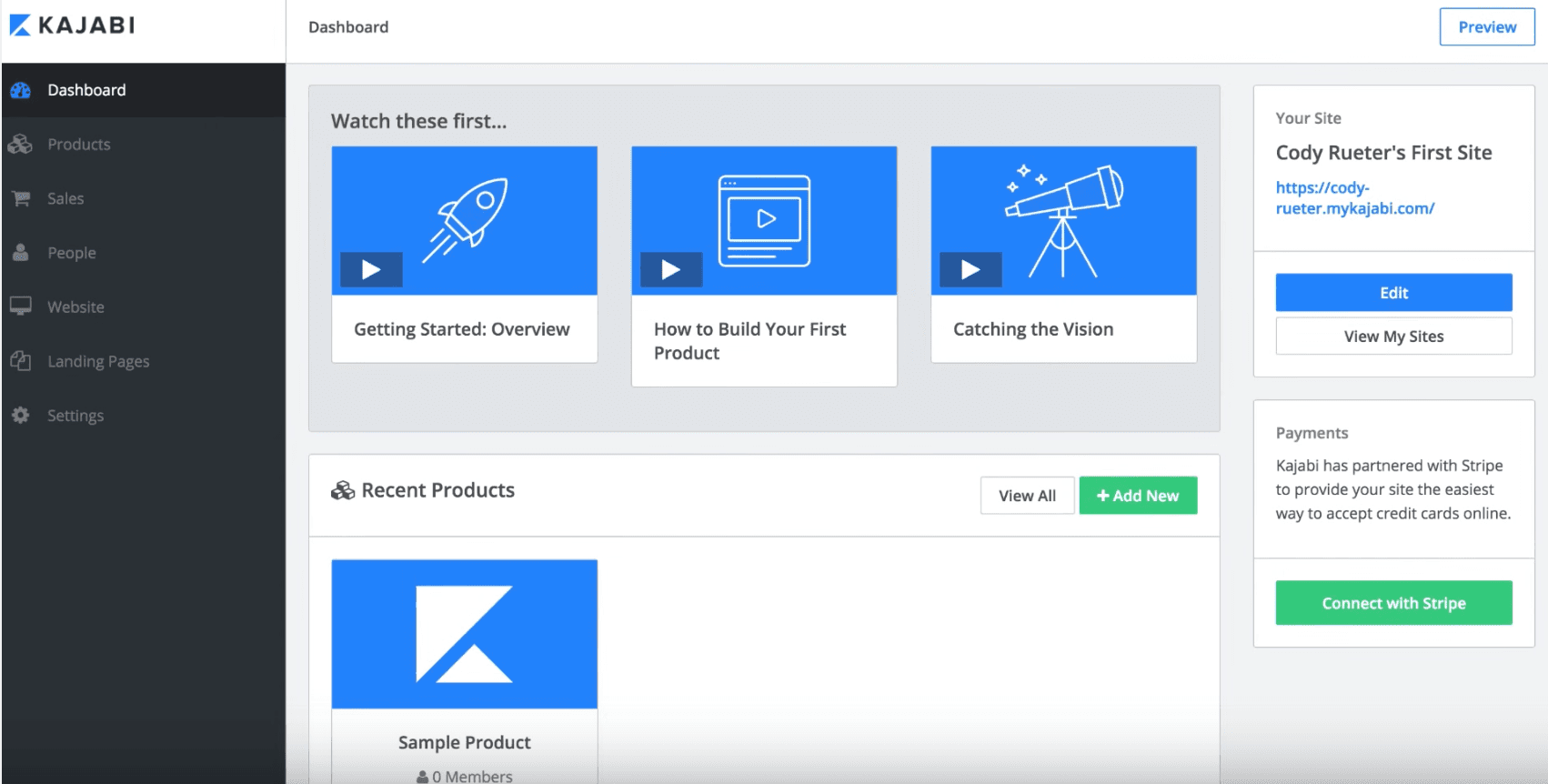
Thinkific vs Kajabi: Ownership vs All-in-One
Kajabi is the premium all-in-one course platform. It includes a website builder, email marketing, sales funnels, automation pipelines, memberships, podcasting, and a mobile app. If you want everything in one place and you are willing to pay for convenience, Kajabi delivers. The dashboard gives you products, pipelines, email, and analytics all under one roof.
The tradeoffs: Kajabi starts at $149/month (vs Thinkific's $49/month). As your email list grows, Kajabi's price increases with it. You are locked into Kajabi's ecosystem for email, funnels, and design. If you ever want to switch email providers, add a specialized funnel tool, or migrate to a different platform, you are rebuilding from scratch. Your email list, your automations, your funnels, all of it lives inside Kajabi.
Thinkific takes the opposite approach. It handles course delivery and your website, then lets you plug in the best external tools for email, funnels, community, and automation. You pay less upfront and keep the flexibility to swap tools as your needs change. If you are just starting and want to keep costs under $50/month while you validate your course, Thinkific is the smarter choice. If you are doing $10K+/month and want to consolidate tools, Kajabi is worth evaluating.
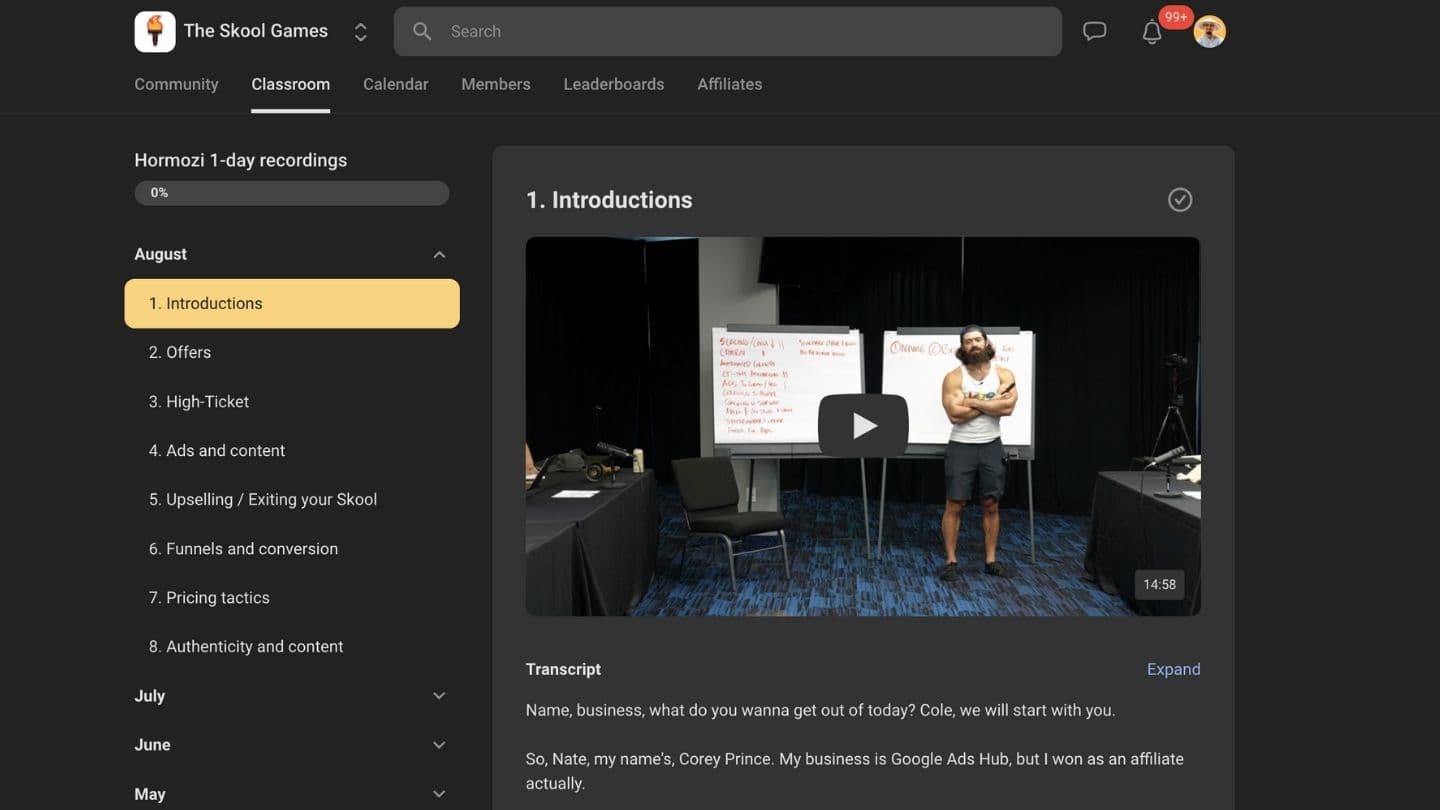
Thinkific vs Skool: Ownership vs Community
Skool is the simplest platform on the market. The built-in community experience is genuinely the best available. If your business is community-driven (paid masterminds, live Q&As, group coaching, daily discussion), Skool is hard to beat. The gamification, leaderboards, and engagement tools create a sticky experience that keeps members coming back.
But you do not own anything on Skool. There is no custom domain. There is no sales funnel builder. You cannot customize the design. Your course content lives inside Skool's interface, not your own website. You cannot embed content from other platforms, control your checkout experience, or build landing pages. You build your entire sales funnel outside of Skool and just link people in.
Thinkific gives you full ownership. Your domain, your branding, your checkout, your landing pages. You can embed podcast episodes and YouTube videos. You can run upsells, bundles, and order bumps. You control the entire customer journey from first click to course completion. If you are building a real brand with SEO, content marketing, and paid ads driving traffic to your own site, Thinkific is the clear winner. If your business runs on community engagement and you do not care about owning the platform, Skool is great at what it does.
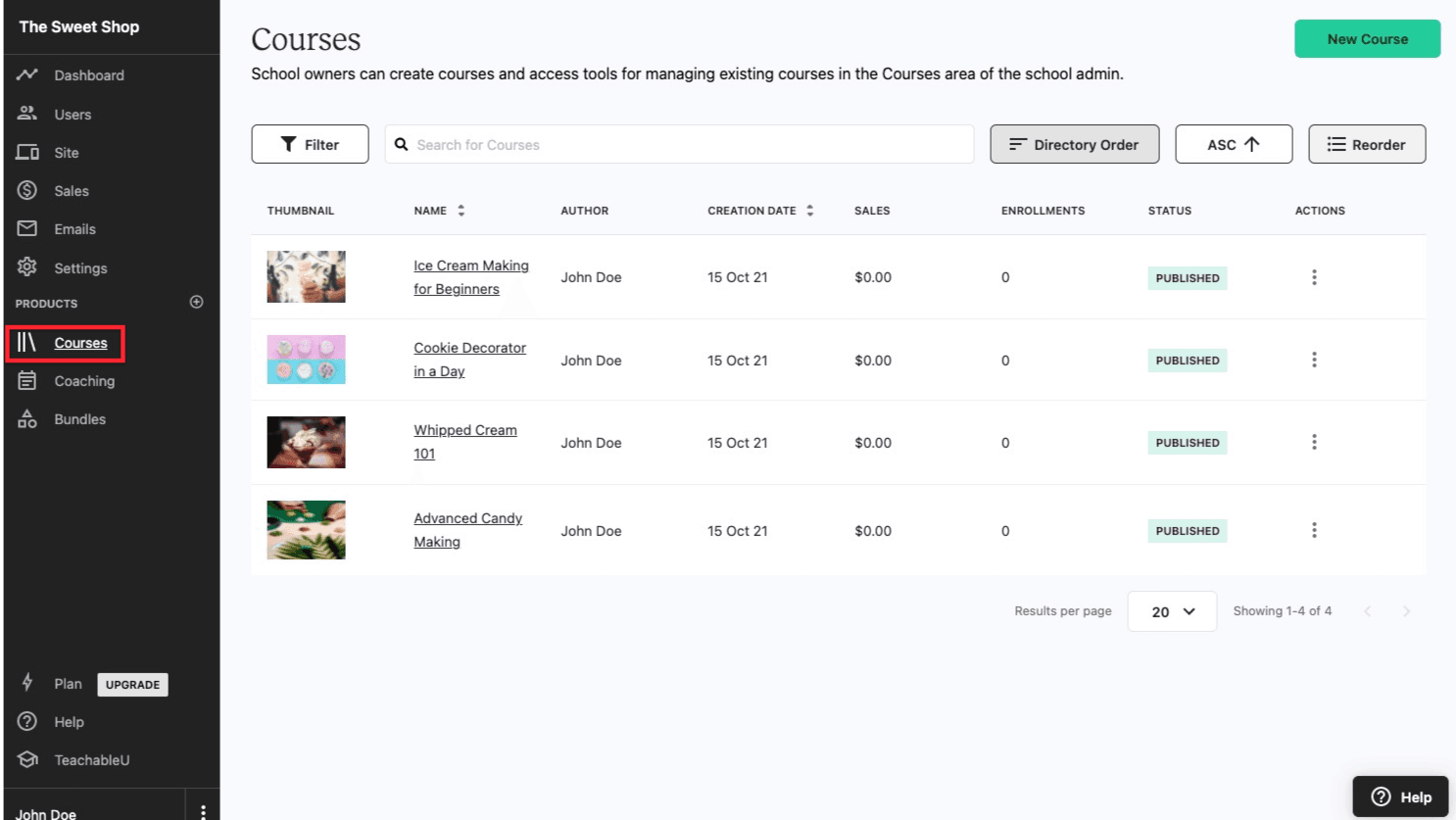
Thinkific vs Teachable: The Direct Competitor
Teachable is the closest competitor to Thinkific. Both are course platforms with website builders, payment processing, and student management. The critical difference is fees. Teachable charges a 5% transaction fee on its Basic plan ($59/month). Thinkific charges zero on every plan including the free tier.
Teachable has a slight edge in design polish. Some creators find Teachable's course pages look cleaner out of the box with less customization needed. But Thinkific offers more free-plan features, better pricing at scale, and a more longer free trial period and lower starting price ($49 vs $59).
For most creators, Thinkific wins on value. The zero transaction fee saves real money as you scale. If you sell $10,000/month in courses, you save $500/month compared to Teachable's Basic plan. Over a year, that is $6,000. The free trial lets you build and validate your course before committing to a paid tier. Unless Teachable's specific design aesthetic is a dealbreaker for you, Thinkific is the better financial choice.
Thinkific vs Kajabi vs Skool vs Teachable: Full Comparison
| Feature | Thinkific | Kajabi | Skool | Teachable |
|---|---|---|---|---|
| Best For | Owned course website | All-in-one business | Community-driven | Simple course selling |
| Custom Domain | Yes (all paid plans) | Yes | No | Yes |
| Transaction Fees | 0% on all plans | 0% | 0% | 5% on Basic |
| Website Builder | Full (10 themes, 23 sections) | Full | None | Basic |
| Email Marketing | Via integrations | Built-in | None | Basic built-in |
| Community | Built-in (basic) | Built-in | Best in class | None |
| Sales Funnels | Via integrations | Built-in | None | Basic |
| Live Lessons | Yes (Zoom integration) | Yes | No | Yes (Zoom) |
| Mobile App | Yes (Start plan+) | Yes | Yes | Yes |
| Free Trial | Yes (30 days with affiliate link) | 14-day trial | No | 14-day trial |
| Starting Price | $49/month | $149/month | $99/month | $59/month |
| App Store / Integrations | 80+ integrations | Limited | None | Limited |
| Affiliate Marketing | Yes (Basic plan+) | Yes | Yes | Yes |
Ready to build your course business?
Get a 30-day extended free trial with our link. Build your entire course, connect your domain, and launch with zero transaction fees.
Frequently Asked Questions
Is Thinkific free?
Thinkific offers a free trial on all paid plans so you can build your course before paying. With our link, you get an extended 30-day trial. Plans start at $49/month ($36 annually).
Does Thinkific charge transaction fees?
No. Zero transaction fees on every plan. You only pay standard Stripe or PayPal processing (roughly 2.9% + $0.30). Teachable charges 5% on its Basic plan, making Thinkific the better deal.
Is Thinkific better than Kajabi?
Thinkific wins on price and flexibility ($49/month vs $149). Kajabi wins if you want email, funnels, and automation built in. Thinkific lets you pick best-in-class tools for each job.
Is Thinkific better than Skool?
Thinkific gives you a branded website on your own domain. Skool gives you the best community experience but no custom domain, no site builder, and no checkout customization.
Is Thinkific better than Teachable?
For most creators, yes. Zero transaction fees vs Teachable's 5% on Basic. Lower starting price ($49 vs $59). Teachable has a slight edge in design polish, but Thinkific saves more money at scale.
Is Thinkific good for beginners?
Yes. Guided onboarding, pre-built templates, free training courses, and a risk-free trial make it one of the most beginner-friendly course platforms available.
Can you make money with Thinkific?
Yes. Over 50,000 creators have processed $650+ million in course sales on Thinkific. Zero transaction fees mean you keep more of every sale. Creators sell courses from $29 to $2,000+ successfully.
Is Thinkific legit?
Yes. Publicly traded (TSX: THNC), founded in 2012, 200+ employees, 4.6/5 on Trustpilot from 701 reviews. It is a well-established, legitimate platform used by tens of thousands of creators worldwide.
What are the disadvantages of Thinkific?
Limited website templates, no built-in email marketing, basic community vs Skool, reporting lacks advanced analytics, and Thinkific branding only removed on the Grow plan ($199/month).
Can I use my own domain with Thinkific?
Yes. All paid plans include custom domain support at no extra charge. Point your domain or subdomain to Thinkific and your course site lives entirely on your brand.
What Creators Are Saying
"I switched from Teachable to Thinkific and immediately saved over $200/month in transaction fees. The course builder is just as good and my students love the new site design."
Course creator, via G2
"I compared Thinkific, Kajabi, and Teachable for three months. Thinkific gave me the best balance of price, features, and ownership. The zero transaction fees sealed the deal."
Coach, via Trustpilot
How We Reviewed Thinkific
We evaluated Thinkific based on course builder quality, website customization, pricing value, transaction fee structure, community features, integrations, student engagement tools, payment flexibility, and how it compares to Kajabi, Skool, and Teachable. Our assessment includes hands-on course creation, analysis of user reviews on G2, Trustpilot, and eLearning Industry, and research into current features and pricing across all plans.
Our Verdict
Thinkific is the best course platform for creators who want to own their brand and keep their revenue. The zero transaction fee model, full website builder, and extended free trial make it the smartest starting point for anyone building a course business. You get the control of building on your own domain with the simplicity of a drag-and-drop builder. Pair it with best-in-class tools for email and marketing, and you have a course business that you fully own and can scale without limits.
Best for: Course creators, coaches, consultants, and educators who want full brand ownership, zero transaction fees, and the flexibility to grow without being locked into one ecosystem.